GATEWAY M500B1 Laptop Drive Caddy
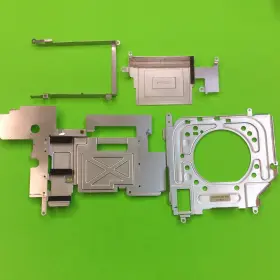
( Brand: Gateway ), ( Model: GATEWAY M500B1 ), ( Type: Drive Caddy ), ( Compatible Brand: For Gateway ), ( Guarantee: 30 Day Money Back ), ( Manufacturer Part Number: M500B1 )
Review GATEWAY Laptop Computer Drive Caddy
The Gateway M500B1 Laptop Drive Caddy is a versatile and practical accessory designed to provide an easy solution for upgrading or adding an additional hard drive to your Gateway laptop. This caddy is specifically engineered for Gateway laptops with a 2.5-inch SATA hard drive bay, making it a perfect fit for models such as the Gateway NV55S11u, NV55S11u.1, NV55S11u.3, NV55S11u.5, and NV55S11u.6.
This sturdy and lightweight caddy is made of high-quality materials, ensuring durability and reliability. It features a sleek and slim design, allowing it to blend seamlessly with your laptop. The caddy comes with all necessary mounting hardware, including screws and a star washer, for a quick and easy installation process.
The Gateway M500B1 Laptop Drive Caddy supports both 2.5-inch SATA I and SATA III hard drives, providing flexibility for users who may want to upgrade to faster storage technologies. The caddy also includes a thermal pad to help keep the hard drive cool and operating at optimal temperatures.
The installation process is straightforward, requiring no special tools or technical expertise. Simply open the laptop, remove the existing hard drive, and replace it with the new one in the caddy. The caddy also includes a convenient locking mechanism to help secure the hard drive in place and prevent accidental dislodgment.
By using the Gateway M500B1 Laptop Drive Caddy, you can easily upgrade your laptop's storage capacity or add a secondary hard drive for extra data storage or backup purposes. The caddy is also a cost-effective alternative to purchasing a new laptop with a larger hard drive, making it a smart choice for budget-conscious consumers.
In summary, the Gateway M500B1 Laptop Drive Caddy is a must-have accessory for any Gateway laptop user looking to upgrade their storage capacity or add an additional hard drive. It is easy to install, supports both SATA I and SATA III hard drives, and is made of high-quality materials to ensure durability and reliability.
Buying a Gateway M500B1 laptop drive caddy can offer several advantages and potential drawbacks, depending on your specific needs and circumstances. Here are some pros and cons to consider:
Pros:1. Additional Storage: A laptop drive caddy allows you to add an internal hard drive to your laptop, providing additional storage capacity without the need for external drives.
2. Faster Access: Internal storage is generally faster than external storage, making it a better option for frequently accessed files or applications.
3. Convenient: A drive caddy can be easily installed and removed, making it a convenient solution for users who need to switch between different hard drives or backup drives.
4. Cost-Effective: The cost of a laptop drive caddy is generally lower than the cost of purchasing a new laptop with a larger hard drive.
Cons:1. Installation: Installing a laptop drive caddy may require some technical knowledge and expertise.Users may need to open up their laptop and connect the hard drive to the motherboard, which can be a complex process for some.
2. Compatibility: Not all laptop models are compatible with all drive caddies.Users need to check the specifications of their laptop and the drive caddy to ensure compatibility.
3. Limited Expansion: A laptop drive caddy only allows for the addition of one internal hard drive, whereas external drives can accommodate multiple drives.
In conclusion, a Gateway M500B1 laptop drive caddy can be a worthwhile investment for users who require additional storage capacity, faster access to files, and the convenience of an internal drive. However, users should be aware of the potential challenges involved in installation and compatibility, and consider whether the benefits outweigh the costs.
If you are comfortable with the installation process and your laptop is compatible with the caddy, then it can be a cost-effective solution for expanding your laptop's storage capacity. Alternatively, if you prefer a more convenient solution or require more than one internal drive, you may want to consider external storage options instead.
Details:
CAREFULLY RECOVERED FROM A WORKING GATEWAY M500B1 LAPTOP COMPUTER. Repair your Laptop with this Drive Caddy. Simply by fixing what is broken. One inch by one 1 x 1 square.
SATISFACTION GUARANTEED!: Double checked by our technician to be in proper order. Grid if shown in images is approx. 12217/L12A 302.301 0x4 #I:10056207 DRIVE CADDY.
part #: m500b1 prices
- $9.99-$17.99
specifications dribaycad:
- brand: Gateway
- model#: GATEWAY M500B1
- type: Drive Caddy
- compatible brand: For Gateway
- guarantee: 30 Day Money Back
- manufacturer part number: M500B1
offer dribaycad:
- quantity: 1
- sold: 0
- options: Ship-to-home
- availability: In Stock
- started: October 30, 2025
general dribaycad:
- Computers/Tablet's Networking > Drives, storage Blank Media > Driv Caddies
- condition: Used
payments dribaycad:
- other
- wallet: Paypal
- credit card: Visa
returns dribaycad:
- policy: Returns Accepted
- paid by: Seller
- time: 30 Days
- method: Money back
shipping dribaycad:
- cost: $0.00
- service: USPS First Class, USPS Priority Mail
- transit: 5-9 Days
- class: Standard, Expedited
- carrier: USPS
- type: Calculated
seller dribaycad:
- # reviews: 1549
- city: California, Pennsylvania
- rating: 99.6%
Gateway M500B1 Is Similar To:
- Gateway 60.4bu04.001 Ms2274 Hdd Hard Drive Caddy (57.8% similar) Used Gateway MS2274 HDD hard drive caddy 60.4BU04.001 in good condition...(July 22nd, 2024)
- Gateway 2ja26-007a 838gm Desktop Computer Drive Caddy (73.7% similar) Carefully recovered from a working Gateway 838GM desktop computer. Grid if shown in images is approx. Satisfaction guaranteed!: double checked by our technician to be in proper order. Better for, the planet: easy on, wallet: great your soul: because your PC is a terrible thing to waste...(September 3rd, 2024)
- Gateway 13p1-2ln0c01 23 Inch Zx6971 Aio Oem Hdd Hard Drive Caddy (52.8% similar) 3.5 Gateway caddy carefully removed in excellent condition...(December 6th, 2024)
- Gateway C90881-001 Lot Of 2 3.5 Inch Hdd Hot Swap Caddy Tray Carrier Assembly (35.3% similar) Any offers or bids placed could be accepted end up being the winning bid. This listing is for the item above...(February 10th, 2025)
- Gateway Nv76r06u Vg70 17.3 Inch Hard Drive Caddy 13n0-7na0801 (40.4% similar) Some items are flat and might be shipped in a regular white envelope, make sure you didn't put it the bills pile or that other people home did same, believe not does happen, have had several buyers waiting an extra 2 weeks then found out significant bill. Buyer pays return shipping...(September 4th, 2025)
- Gateway 8002682 Solo 2500 Laptop Hard Drive Tray And Floppy Disc 5500656 (50.9% similar) We encourage you to thoroughly examine all the provided pictures. Physical condition the item is in good physical condition. Mons - 8002682 5500656. Gateway solo 2500 laptop hard drive tray floppy disc. Shipping: if...(September 17th, 2025)
- Gateway 6020gz Maz Laptop Computer Drive Caddy (86.4% similar) 15005/L47A 294.294 0X4 #I:10106341 drive caddy. Satisfaction guaranteed!: double checked by our technician to be in proper order. Grid if shown in images is approx. One inch by one 1 x 1 square. Simply by fixing what is broken. Carefully recovered from a working Gateway 6020GZ maze...(October 22nd, 2025)
- Gateway 200arc Laptop Computer Drive Caddy (90.5% similar) Grid if shown in images is approx. Simply by fixing what is broken. Carefully recovered from a working Gateway 200ARC laptop computer. One inch by one 1 x 1 square. 13202/L95E 302.301 0X4 #I:10086015 drive caddy. Satisfaction guaranteed!: double checked by our technician to be in...(October 30th, 2025)
- Gateway 400vtx Laptop Computer Dual Caddy Drive (76.4% similar) Satisfaction guaranteed!: double checked by our technician to be in proper order. Simply by fixing what is broken. 12899/L33E 302.301 0X4 #I:10062351 drive caddy. One inch by one 1 x 1 square. Carefully recovered from a working Gateway 400VTX laptop computer. Repair your laptop with...(October 31st, 2025)
- Gateway 1b236v400 Desktop Hard Drive Caddy Cage Casing Sx2110g-uw308 (50.9% similar) We normally take many photos to help guide you in your decision. Please review all photos carefully for wear on used / pre-owned broken items before purchasing. Make model: Gateway SX2110G-UW308. Thanks: -, this item is used and in great working condition. The cosmetic...(January 13th, 2026)
- Gateway 1b013m300-000-g Gt5660e Pc Computer Drive Caddy P n (65.3% similar) Satisfaction guaranteed!: double checked by our technician to be in proper order. Carefully recovered from a working Gateway GT5660E PC computer. Repair your computer with this drive caddy. 38.38 0X4 #P:1005765 drive caddy p/n 1B013M300-000-G. Simply by fixing what is broken. One inch by...(February 8th, 2026)

5 offers $9.99–$17.99 USD
- Used. Offer #1 priced at $13.95 + $0.00 delivery = $13.95* total. CAREFULLY RECOVERED FROM A WORKING GATEWAY LAPTOP COMPUTER . PART 60.44T08.001.FREE SHIPPING
- New. Offer #2 priced at $17.99 + $0.00 delivery = $17.99* total. Lot Available. Compatible Models: for Gateway M-6207m NX260X NX260 E-155C NX250X, #A1.FREE SHIPPING
- New. Offer #3 priced at $9.99 + $0.00 delivery = $9.99* total. 1 x DC Power Jack. Compatible Models: FOR Gateway 7510GX W730-K8X W730 MX7337H 7405 MX7515, #CJ-9.FREE SHIPPING
- New. Offer #4 priced at $9.99 + $0.00 delivery = $9.99* total. 1 X DC JACK. For Gateway 7510GX W730-K8X W730 , #CJ-9.FREE SHIPPING
- Used. Offer #5 priced at $13.95 + $0.00 delivery = $13.95* total. KEY BUTTON BOARD VHX0710.FREE SHIPPING