LENOVO EBQU8012010 Drive Caddy Thinkcentre M90Z
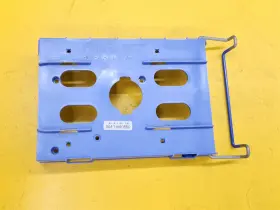
( Brand: Lenovo ), ( Type: Caddy ), ( Color: Blue ), ( Manufacturer Part Number: EBQU8012010 )
Review LENOVO All in one Pc Hard Drive Caddy Thinkcentre
The Lenovo EBQU8012010 All-in-One Drive Caddy is a versatile and practical accessory designed specifically for the ThinkCentre M90z All-in-One desktop. This drive caddy adds an additional 2.5-inch SATA hard drive or solid-state drive bay to your system, expanding its storage capacity without requiring you to open the PC or disrupt its sleek design.
Crafted from high-quality materials, the drive caddy is built to last. Its robust construction ensures stable and secure installation of the hard drive or SSD, while its slim design keeps it unobtrusive and complements the aesthetic of the ThinkCentre M90z. The caddy is also easy to install, with a tool-less design that allows for quick and hassle-free installation and removal of drives.
The Lenovo EBQU8012010 All-in-One Drive Caddy also features a convenient front-access design, which makes it easy to access the drive bay without having to open the PC. This feature is especially useful for IT administrators or users who need to frequently swap out drives or perform maintenance tasks. Additionally, the drive caddy includes thermal padding to help keep the drive running cool and efficiently.
Overall, the Lenovo EBQU8012010 All-in-One Drive Caddy is an excellent investment for anyone looking to expand the storage capacity of their ThinkCentre M90z All-in-One desktop. Its robust design, easy installation, and convenient front-access features make it a must-have accessory for both personal and professional use.
The Lenovo EBQ8012010 all-in-one drive caddy for ThinkCentre M90z is a device designed to add an additional storage drive to Lenovo's M90z all-in-one desktop computers. Here are some potential pros and cons of buying this caddy:
Pros:1. Additional Storage: This drive caddy provides an easy and convenient way to add extra storage to your ThinkCentre M90z all-in-one desktop without the need for an external hard drive or complicated internal upgrades.
2. Tool-less Design: Lenovo's tool-less design allows for easy installation and removal of the drive caddy, making it a great option for users who frequently need to access or swap out drives.
3. Compatibility: The Lenovo EBQ8012010 is specifically designed for the ThinkCentre M90z, ensuring a perfect fit and compatibility with your desktop.
4. Hot-Swap Capability: This drive caddy supports hot-swap functionality, which means you can replace or install a new drive without powering down your computer, saving time and increasing productivity.
Cons:1. Cost: Adding an additional storage drive to your ThinkCentre M90z through this caddy may come at an added cost, especially if you factor in the price of the necessary hard drive or SSD.
2. Limited Drive Sizes: Lenovo's EBQ8012010 all-in-one drive caddy supports only 2.5-inch drives, which may limit the size capacity you can install depending on your specific storage needs.
3. Potential Performance Impact: Installing additional drives in your computer can potentially affect overall system performance due to the added load on the system's resources. However, this impact is typically minimal and should not be a significant concern for most users.
In conclusion, the Lenovo EBQ8012010 all-in-one drive caddy for ThinkCentre M90z offers a convenient and easy way to add extra storage to your desktop without the need for external drives or complicated internal upgrades. Its tool-less design, hot-swap capability, and compatibility with the ThinkCentre M90z make it a worthwhile investment for power users or those who frequently require additional storage. However, the added cost and potential limitations in drive size may be a concern for some users. Ultimately, the decision to purchase this drive caddy depends on your specific storage needs and budget.
Recommendation: If you frequently require additional storage for your ThinkCentre M90z all-in-one desktop and prefer a convenient and easy-to-use solution, the Lenovo EBQ8012010 all-in-one drive caddy is an excellent choice. However, if you are on a tight budget or have specific storage requirements that the caddy may not meet, you may want to explore alternative options such as external hard drives or larger internal drives.
Details:
The cosmetic condition of the item is shown to best our ability in pictures we post. We normally take many photos to help guide you in your decision. Please review all photos carefully for wear on used/pre-owned/broken items before purchasing. Make model: Lenovo ThinkCentre M90z.
part #: ebqu8012010 prices
- $79.58-$260.00
specifications dribaycad:
- brand: Lenovo
- type: Caddy
- color: Blue
- manufacturer part number: EBQU8012010
shipping dribaycad:
- class: Expedited
- type: Fixed
- service: Expedited
- cost: $0.00
- transit: 2-6 Days
general dribaycad:
- condition: Used
- Computers/Tablet's Networking > Drives, storage Blank Media > Driv Caddies
offer dribaycad:
- best offers: True
- started: April 28, 2026
- quantity: 1
- sold: 0
- availability: In Stock
- options: Ship-to-home
seller dribaycad:
- # reviews: 25335
- rating: 99.7%
- city: Bellaire, Ohio
returns dribaycad:
- paid by: Seller
- policy: Returns Accepted
- method: Money back
- time: 30 Days
payments dribaycad:
- wallet: Google-pay
- other
- credit card: Discover
Lenovo EBQU8012010 Is Similar To:
- Lenovo Am21p000300 Ideapad 3 15itl6 15.6 Inch Genuine Hdd Hard Drive Caddy With Screws (50% similar) Item has been gently removed from a working laptop Lenovo idea pad 3/1 5ITL6 tested to be in very good condition. Actual item pictured. Make the best deals with us...(June 19th, 2024)
- Lenovo 03t8898 11 Lot 3.5 Inch Sas sata Drive Caddy Tray For Rd650 Rd550 Rd450 Rd350 Td450 (37.2% similar) Please be certain you can use what are buying on, as incompatibility is not a valid reason for return. This is the fastest way to get a response. Included in this sale: qty 1 11 lot 3.5 03T8898 SARS/satay drive caddy tray for RD650 RD550 RD450 RD350 TD450, all unit are tested by...(June 19th, 2024)
- Lenovo Mz20481 Thinkcentre M600 M700 M900 Tiny Ssd Hdd Hard Drive Caddy Tray (50.7% similar) Warranty: a 30 day DOA warranty is included. This part was pulled from a working computer that split into parts, it has been tested and is in excellent condition with no known issues. Exact item pictured, if you don't see it in the picture isn't included...(June 21st, 2024)
- Lenovo Fa13n000e00 Thinkpad E15 15.6 Inch Genuine Hdd Hard Drive Caddy (48.5% similar) Lenovo think pad E15 15.6 genuine HDD hard drive caddy FA13N000E00...(June 21st, 2024)
- Hp 654540-002 Lot 2 Dell Lenovo Universal 2.5 Inch To 3.5 Hdd ssd Tray Adapter Caddy 3 Pc Set (23.9% similar) Warranty: a 30 day DOA warranty is included. This part was pulled from a working computer that split into parts, it has been tested and is in excellent condition with no known issues. Exact item pictured, if you don't see it in the picture isn't included...(June 21st, 2024)
- Lenovo Sc50m73861 Thinkpad T570 T580 P51s P52s Ssd Adapter Cable And Caddy (25.7% similar) Pulled from a working unit...(June 21st, 2024)
- Lenovo 17itl6 Ideapad 3 Hdd Hard Drive Caddy With Screws (52.5% similar) Lenovo idea pad 3/1 7ITL6 HDD hard drive caddy w/ screws. Each sale comes with our quality guarantee. Found better price...(June 24th, 2024)
- Lenovo V15 G2 Genuine Itl 15.6 Inch Laptop Hdd Hard Drive Caddy With Screws (51.1% similar) Genuine Lenovo V15 g2 Ital 15.6 laptop HDD hard drive caddy w/screws. Found better price. Each sale comes with our quality guarantee...(June 24th, 2024)
- Lenovo Am2xd000300 Genuine Thinkbook 14 G2 Itl Sata Hdd Hard Drive Caddy (46.4% similar) Genuine Lenovo think book 14 g2 Ital satay HDD hard drive caddy AM2XD000300. Each sale comes with our quality guarantee. Found better price...(June 24th, 2024)
- Lenovo Ap13n000900 Ideapad 330-15ikb 15.6 Inch Oem Hdd Hard Drive Caddy With Connector (46.1% similar) Actual item pictured. Make the best deals with us. Item has been gently removed from a working laptop Lenovo idea pad 330-15IKB tested to be in very good condition...(June 25th, 2024)
- Acer 1b415d200-600 Lot Of 19 Lenovo 3.5 Inch Hdd Caddy (31.1% similar) Tablet's e-readers. Reproduce warranty does not cover any accidental damage, damage/issues caused by misuse or alteration. Receivers CD players. Data sanitation status prior user sanitized. Any work performed on the laptop by a 3RD party voids reproduce warranty. Lot of 19 - Lenovo...(June 26th, 2024)

5 offers $79.58–$260.00 USD
- Used. Offer #1 priced at $100.00 + $0.00 delivery = $100.00* total. We normally take many photos to help guide you in your decision This item is used and in great working condition! Make & Model: Lenovo ThinkCentre .FREE SHIPPING
- Used. Offer #2 priced at $79.58 + $0.00 delivery = $79.58* total. Comp. Lenovo CADDDY HARD DISK SSD HDD 3.5 "Strict Disc Possible presence of merely aesthetic defects, which do not affect use, such as small pixels defects (ISO-9241-3xx rules), micrographers on the body and/or other defects not visible to more than 30cm from the object deriving from the wear of the object over time; The hardware is however tested, functioning and guaranteed.FREE SHIPPING
- Used. Offer #3 priced at $260.00 + $20.00 delivery = $280.00* total. Made in China, this desktop combines quality and performance in one convenient package. Missing camera open and close switch.+$20.00 shipping
- For parts or not working. Offer #4 priced at $83.99 + $25.00 delivery = $108.99* total. +$25.00 shipping
- Used. Offer #5 priced at $99.95 + $9.95 delivery = $109.90* total. Pulled from a working machine.+$9.95 shipping